The big FlexDrive app update is coming!
Are you already taking advantage of our smart, dynamic billing with BonusDrive or FlexDrive for your auto insurance? If so, an important app update is coming your way next week!
- When? Tuesday, November 10, 2026
- Who’s it for? Everyone using the BonusDrive or FlexDrive payment plans
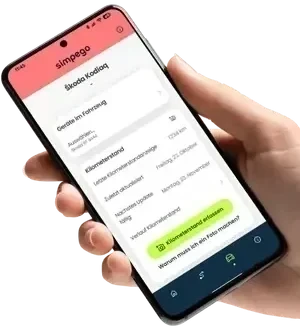
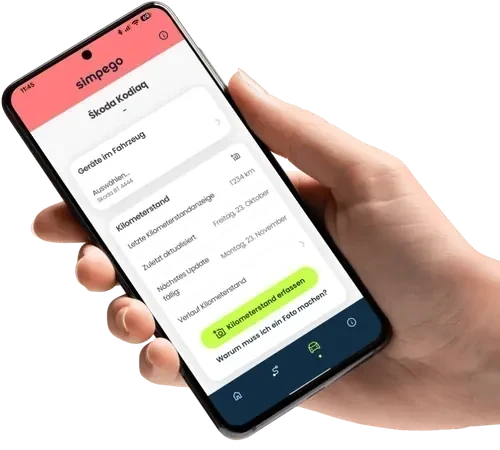
- What’s new? Noticeably lower battery consumption, reliable trip detection thanks to Bluetooth pairing, and automatic mileage reading via photo.
- Your 3 to-dos on November 10:
- Update the app: Download the latest version from the App Store or Google Play.
- Set a password: Click the link in our email and set a new password.
- Pair your car: Log in, connect your smartphone to your car via Bluetooth once, and hit the road!
🚀 What’s new in the FlexDrive app?
Starting November 10, 2026, these three major improvements will be waiting for you:
Lower Battery Usage We’ve significantly optimized the app’s background processes. The result: The app now uses noticeably less battery power while you’re driving.
🚗 Smart Bluetooth Pairing—No more misassigned trips (e.g., when you’re riding with friends)! The app now uses the Bluetooth connection to your vehicle to reliably detect trips and assign them precisely to the car you’ve insured with us.
📸 Automatically Record Your Mileage Typing errors are a thing of the past. From now on, you no longer have to laboriously type in your mileage by hand. Just take a photo of your odometer—the app automatically reads the value and saves it for you.
📅 Here’s what you need
to do on November 10
On Tuesday, November 10, 2026, the update will be available in the app stores.
On that day, you’ll also receive an email from us with a link to your new login.
To ensure you can continue using the app without interruption and that your trips are tracked, you’ll need to follow these three quick steps:
- Update the app: Download the latest version of FlexDrive from the Apple App Store or Google Play.
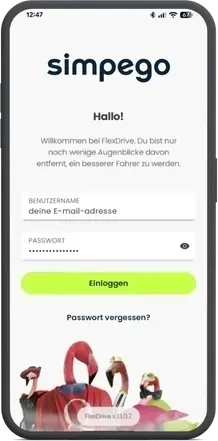
- Reset Your Password: Click the link in our email, log in with your registered email address, and create a new, secure password.
- Set Up the App & Hit the Road Log in to the app with your new password. Follow the brief on-screen instructions (including the one-time Bluetooth pairing with your car), and you’re good to go!
❓ FAQs About the New Update
Updates and Use
When do I need to update the app?
Please install the new version on Tuesday, November 10, 2026.
What happens if I don't update the app?
Unfortunately, without the update, your trips will no longer be tracked starting November 10.
Will I be able to use the app as usual after the update?
Yes, absolutely.
You’ll still have access to all the usual features and can view your recorded trips and mileage at any time.
Username and Password
Why do I have to sign up again?
With the new login system, we’re making your data even more secure. Plus, in the future, you’ll be able to easily reset your password on your own if you ever forget it.
I've registered several vehicles. How does that work?
Log in to all your smartphones using your email address and new password. Then pair each smartphone with its respective vehicle via Bluetooth. That way, the app will always know which car you’re currently in.
I forgot my password—what should I do now?
No problem at all. Just tap “Forgot Password” when you log in and follow the instructions to set a new one.
Trips and Ride Score
Will my previous trips and data be preserved?
Yes! You won’t lose anything with the update. Your entire history will remain safely stored.
Will my driving score so far stay the same?
Because we’ve improved ride detection and sensor control, your ride score will be recalculated. As a result, it may change slightly and will stabilize based on your riding style over the next few days.
Will the update affect my billing period?
No. Your current billing period will continue as usual.
Different people drive the same vehicle. How does that work?
Each person installs the app on their own smartphone and logs in using the shared login. Before the first trip, everyone pairs their smartphone with the car via Bluetooth. This ensures that all trips are recorded correctly, no matter who is behind the wheel.
Bluetooth and Driver Detection
Why is the app asking me to pair my vehicle via Bluetooth?
This is our new key feature for precise tracking! Bluetooth pairing helps the app recognize when you’re actually in your car. This way, trips in other people’s cars or rideshares won’t be mistakenly counted as your own trips. Our tip: Set up Bluetooth pairing in the app under “Infotainment” right before your first trip.
Do I have to repeat the Bluetooth pairing process every time?
No. You set it up once per vehicle, and after that, the app automatically remembers the connection.